If you’ve ever tried to wire a Zerto pre/post script to “go do something real” on a Windows host — update DNS, kick a Slack channel, restart a service, ping the recovery VMs to make sure they actually came up — you know the story. Zerto fires your script, the script does some PowerShell, and then you’re staring at a 200-line file of try/catch plumbing that handles credentials, retries, logging, and “oh by the way, this needs to run as a service account that has rights in AD.” Five VPGs later, you have five copies of that file in slightly different states.
I got tired of doing that. So, I built Webhook Server, well Claude did, but I’m taking credit. 🙂
Disclaimer up front: Webhook Server is a personal open-source project. It is not a Zerto or HPE product, not supported by Zerto, and not endorsed by my employer. Source and releases live at https://github.com/recklessop/webhook-server. Issues and PRs welcome.
What is it?
Webhook Server is a tiny Windows Service that turns HTTP requests into script executions. You configure endpoints in a GUI — a slug, what to run, who’s allowed to call it, how it authenticates — and from then on, anything that can do an HTTP POST can trigger a Windows-side script. Zerto, GitHub, your monitoring tool, a Bash one-liner in a Linux container, a curl from your laptop. Doesn’t matter.
The point isn’t “another webhook listener” — there are a million of those. The point is the Windows-native part. The service runs as LocalSystem, but each individual hook can run as a specific domain account, the user logged in at the keyboard, or whoever, without Task Scheduler in the middle and without you writing a CreateProcessAsUser P/Invoke wrapper. If you’ve ever wanted “a script that fires on HTTP, runs as CONTOSO\svc-dns-updater, returns the output to the caller, and writes a daily-rolling log,” that’s the whole pitch.
Why a service and a GUI?
Because the alternative is owning a listener. You can write a 50-line ASP.NET app to do most of this. People do. Then a week later you’re adding bearer-token auth. A month later you’re adding HMAC signing because GitHub wants it. A quarter later you’re writing a Windows service wrapper because IIS isn’t the right answer for this anymore. Eventually you’ve built half of what Webhook Server already does, but worse, because you’re maintaining it on the side.
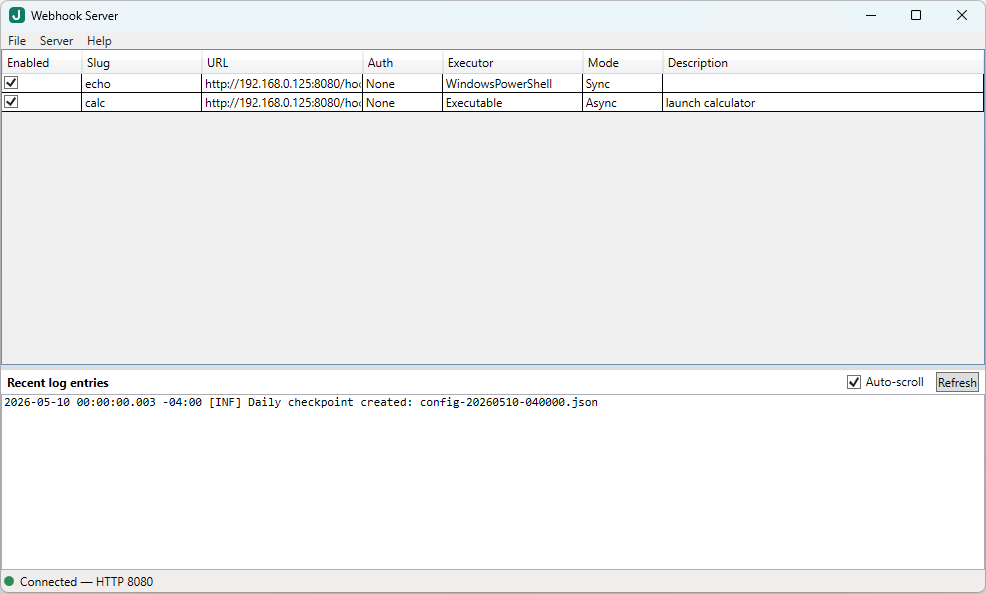
What you get out of the box:
- A real Windows Service that survives reboots and runs without anyone logged in
- Per-endpoint authentication: Bearer token, HMAC (GitHub / Stripe / Slack style), or none
- Per-endpoint IP allowlist with CIDR support
- Per-endpoint Run As: service account, the interactive user, or a named domain/local user via password — encrypted at rest with DPAPI
- Sync or async per endpoint. Sync returns exit code + stdout/stderr to the caller; async returns 202 immediately
- Outbound callbacks — when a hook finishes, the server can POST the result to another URL, HMAC-signed, with retry-and-backoff
- HTTPS via
.pfxor a cert-store thumbprint - Serilog daily-rolling logs with a tail view inside the GUI
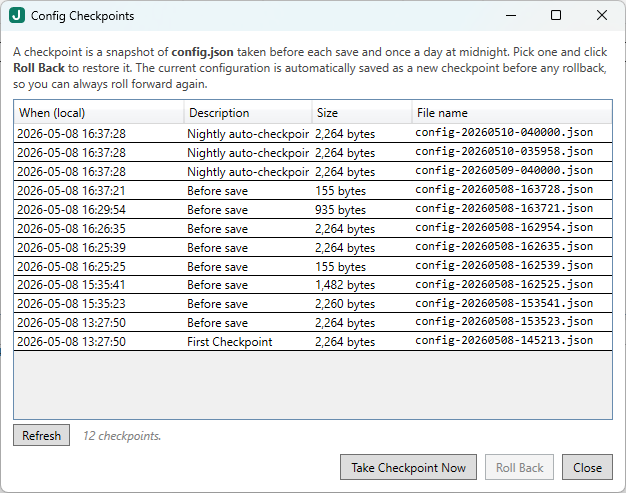
- Auto-snapshots of your config on every save, with point-in-time restore from the GUI (“Config Checkpoints”)
- A WPF GUI for adding / editing / testing endpoints. No JSON file editing required.
The whole thing is x64 Windows-only, .NET 8. The installer is ~3 MB and the v0.1.5 build auto-detects and downloads the .NET 8 runtimes if they’re missing — relevant for a fresh Windows Server install.
Server Configuration Screen
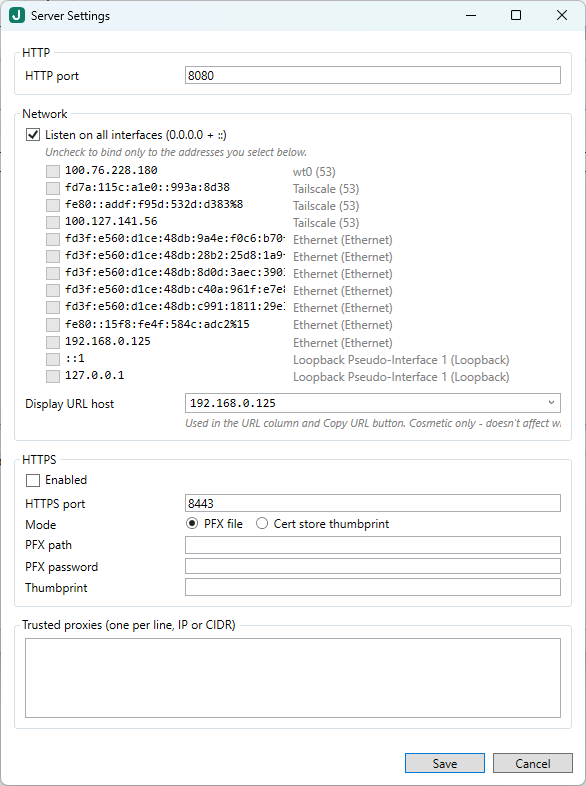
Configuration Checkpoints
The motivating use case: Zerto pre/post scripts
This is what kicked it off. Zerto VPGs let you run a pre-recovery script and a post-recovery script, but those scripts run wherever your ZVMA is. The Linux ZVMA in particular runs scripts inside a small Linux container — great for portability, less great when “do the thing” is “update DNS in our Windows AD” or “kick off a service on the recovery host.”
The pattern Webhook Server gives you is:
- Zerto fires a tiny pre / post script that does nothing but
Invoke-RestMethoda JSON payload to your webhook URL. - The Webhook Server endpoint, running on a Windows box at the recovery site, does the real Windows-side work — and it has access to AD, DNS, your monitoring API, whatever else lives over there.
- The hook returns quickly (or runs async). Zerto’s VPG sequence isn’t blocked by your downstream automation.
The repo has a ready-made recipe for this: a ZVMA pre/post recipe. It ships the receiver scripts too — Slack/Teams notifications, post-recovery VM health checks, an env-var dump for debugging.
But — and this is the part I want to be clear about — Webhook Server has nothing Zerto-specific in it. The Zerto bits live entirely in the example scripts. The server itself is just “HTTP request comes in, your script runs, your stdout goes back out.”
What else can you point it at?
A non-exhaustive list of things this could be used for:
- GitHub webhooks that build or deploy something on a Windows host. HMAC signature verification is built in — paste the GitHub secret into the endpoint config and you’re done.
- Monitoring alerts from PRTG / LibreNMS / your SIEM that need to do something Windows-side: restart a stuck service, run a one-off
Repair-cmdlet, gather a diagnostic bundle. - IoT / Raspberry Pi
curlfrom a shell script when the easiest way to “run this on the Windows box” is just to expose it as a URL.
Anywhere your existing stuff already speaks HTTP and you need the response to be “something happened on Windows,” it fits.
A peek at an endpoint
Adding an endpoint takes about a minute. In the GUI:
- File → New endpoint
- Slug:
update-dns - Auth → Mode: Bearer, paste a 32-byte secret
- Allowed clients:
10.20.0.0/16(your DR subnet, say) - Executor → Windows PowerShell, script path
C:\scripts\update-dns.ps1 - Data passing: ✓ JSON body to stdin
- Run As: a domain account that can update your AD-integrated DNS zone
- Response: Sync, timeout 30s, fail on non-zero exit
- Save.
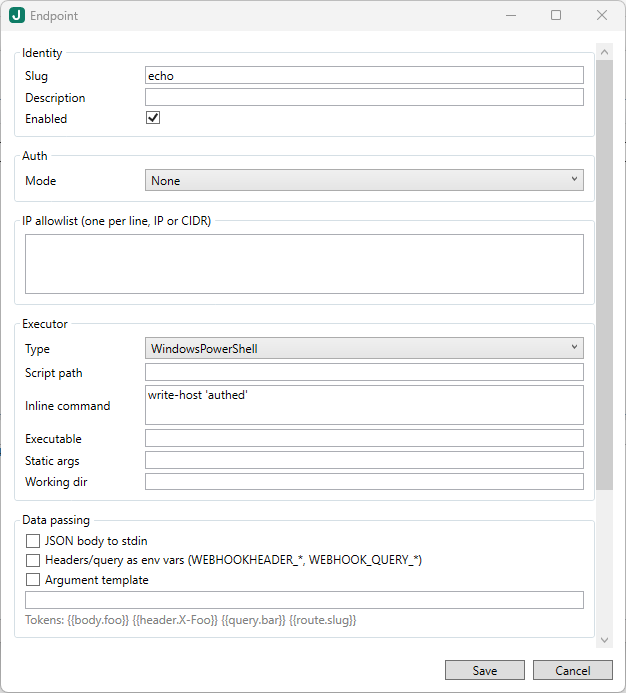
Hit http://your-host:8080/hook/update-dns with the bearer token and a JSON body, and your script runs as the right account, against the right AD, with retries and logging you didn’t have to write.
If something breaks, the GUI has a tail of the daily log right there, plus a run history showing every call’s exit code, duration, stdout, and stderr. No more “is my Task Scheduler task running? did it log anywhere? what account is it as?”
How to get started
- Download the latest installer: https://github.com/recklessop/webhook-server/releases/latest
- Run it. UAC prompts, next-next-finish. The installer registers the service, starts it, and offers to launch the GUI. (On a fresh Windows Server, it’ll also fetch the .NET 8 runtimes silently — only happens once.)
- Open the GUI, add your first endpoint, hit it with
curl. Five minutes.
Docs live in the repo — there’s a Concepts page if “what is a webhook even” is where you’re starting from, and a Run As modes page covering the gMSA / domain-account / interactive-user permutations.
Feedback wanted
I’d love to know what you build with it, what you wish it did, and what you ran into that the docs didn’t cover. File an issue at https://github.com/recklessop/webhook-server/issues, ping me on Twitter, or just email me — all the usual contacts are on this site.