If you’ve installed Zerto for HPE Morpheus / HVM (VM Essentials), you know the appliance doesn’t show up as a nice single OVA you point a wizard at. Zerto for HVM ships as a zip of qcow2 disks and the documentation has you build everything around those disks by hand in Morpheus.
That process seems overly complex and prone to errors. So, I built zDeploy, a small wizard that does the whole thing through the Morpheus API.
Disclaimer up front: zDeploy is a personal community project. It is not an official HPE or Zerto product, it isn’t supported by HPE or Zerto, and it comes with no warranty. Please don’t open HPE or Zerto support cases about it. The official Zerto documentation is still the supported way to deploy the appliance; zDeploy automates the same steps, and if the two ever disagree, the docs win. Test it in a lab before you point it at anything you care about.
What the manual install looks like
Here’s the documented process for getting one ZVM (or ZCM) running on HVM:
- Download the bundle and unzip it. Twice, actually. The download (
zvml-hvm-10...zip) contains another zip (appliance-build-…zip) plus its.sha256, and that inner zip holdsmetadata.jsonand four qcow2 disks: a 30 GiB root disk and three 50 GiB data disks. - Create a service plan for the appliance: 6 vCPU, 16 GB of RAM (8 GB reserved), 180 GB of disk.
- Create a virtual image in Morpheus: type qcow2, OS Debian 12 64-bit, cloud-init on.
- Upload the disks to that image, plus
metadata.json. That’s 7.9 GiB of upload for 10.10, and Morpheus needs the metadata file to know it should create one volume per disk. - Provision the instance with the right plan, one volume per disk, on a datastore with room for the full 180 GB, on the right network, with a static IP.
- Wait, then browse to
https://<ip>/managementto finish the appliance setup.
None of those steps is hard on its own. But there are a lot of them, they’re spread across several Morpheus screens, and every one is a chance to fat-finger a value. A customer doing this once a year has to relearn it every time.
So I built zDeploy
zDeploy is a single executable. You download the one for your OS, put it next to the Zerto bundle, and run it (double-click works on Windows). It opens a wizard in your browser on 127.0.0.1. Nothing gets installed, and there’s no server to stand up.
The wizard has five steps.
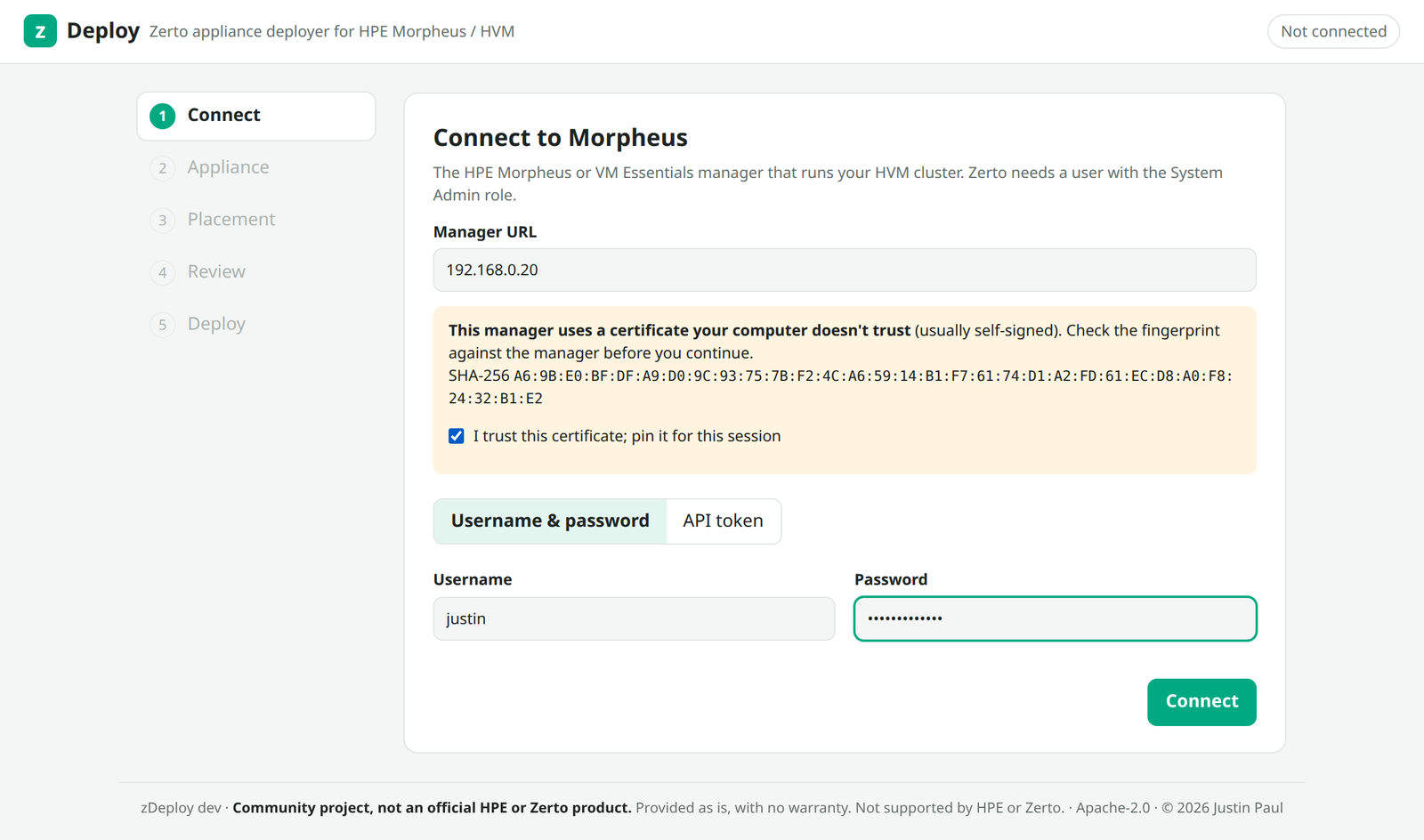
1. Connect
Give it your Morpheus manager URL and a username and password, or an API token. Most labs run a self-signed certificate on the manager, so zDeploy shows you the SHA-256 fingerprint and pins it for the session once you confirm it.
2. Appliance
Point it at the bundle. It takes the zip exactly as you downloaded it from Zerto. No unzipping. It pulls out the inner zip once and checks it against Zerto’s .sha256 file. It also takes the inner zip, or a folder you already extracted. Then it reads metadata.json and the header of every qcow2 disk, and shows you what’s in the bundle before anything touches Morpheus.
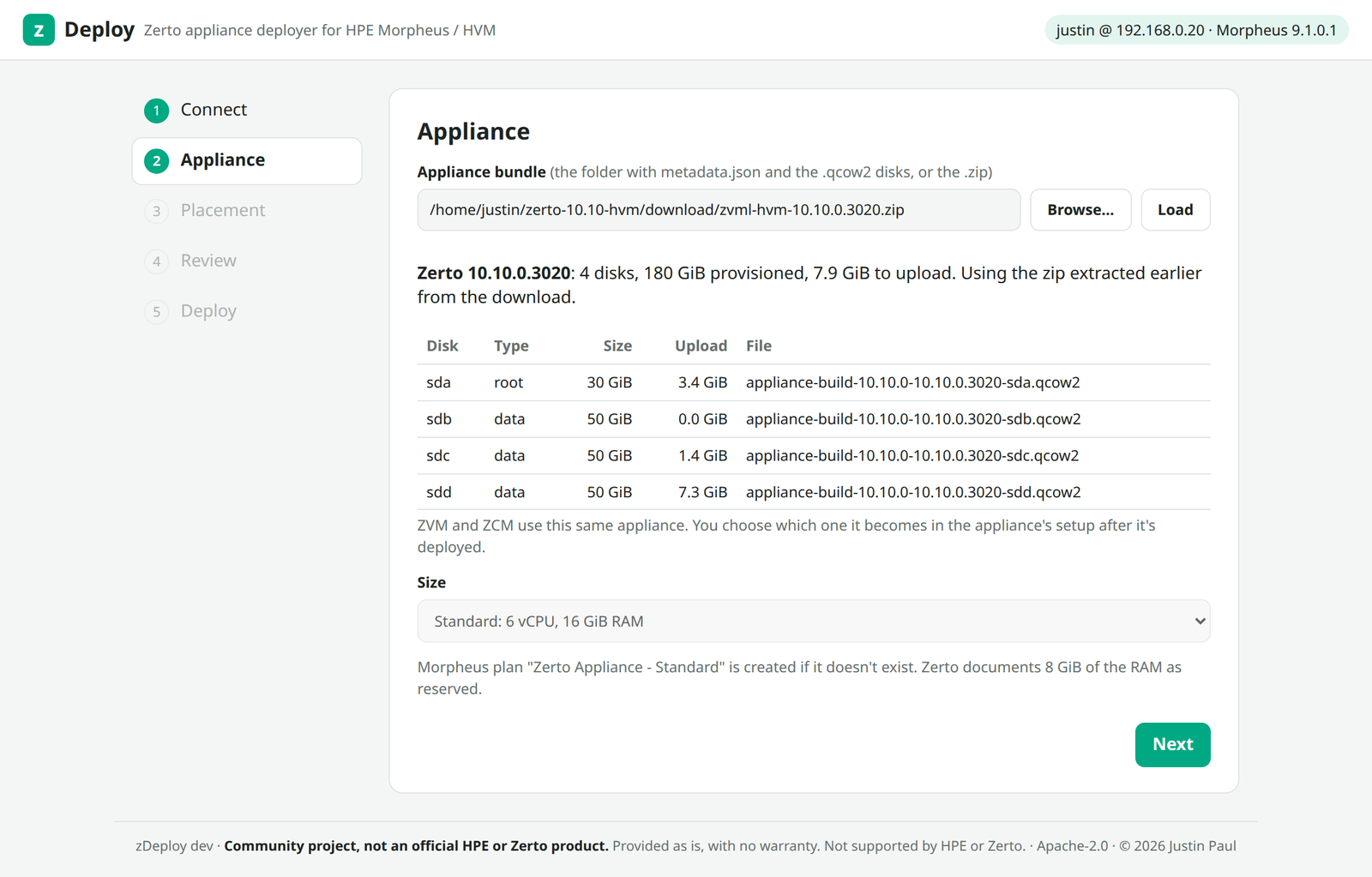
ZVM and ZCM are the same image, so there’s no role picker here. You choose which one the appliance becomes in its own setup screens after it boots. Today there’s one size, matching the Zerto system requirements (6 vCPU, 16 GiB RAM, 180 GiB disk), and the size list is already wired in for when small/medium/large profiles show up.
3. Placement
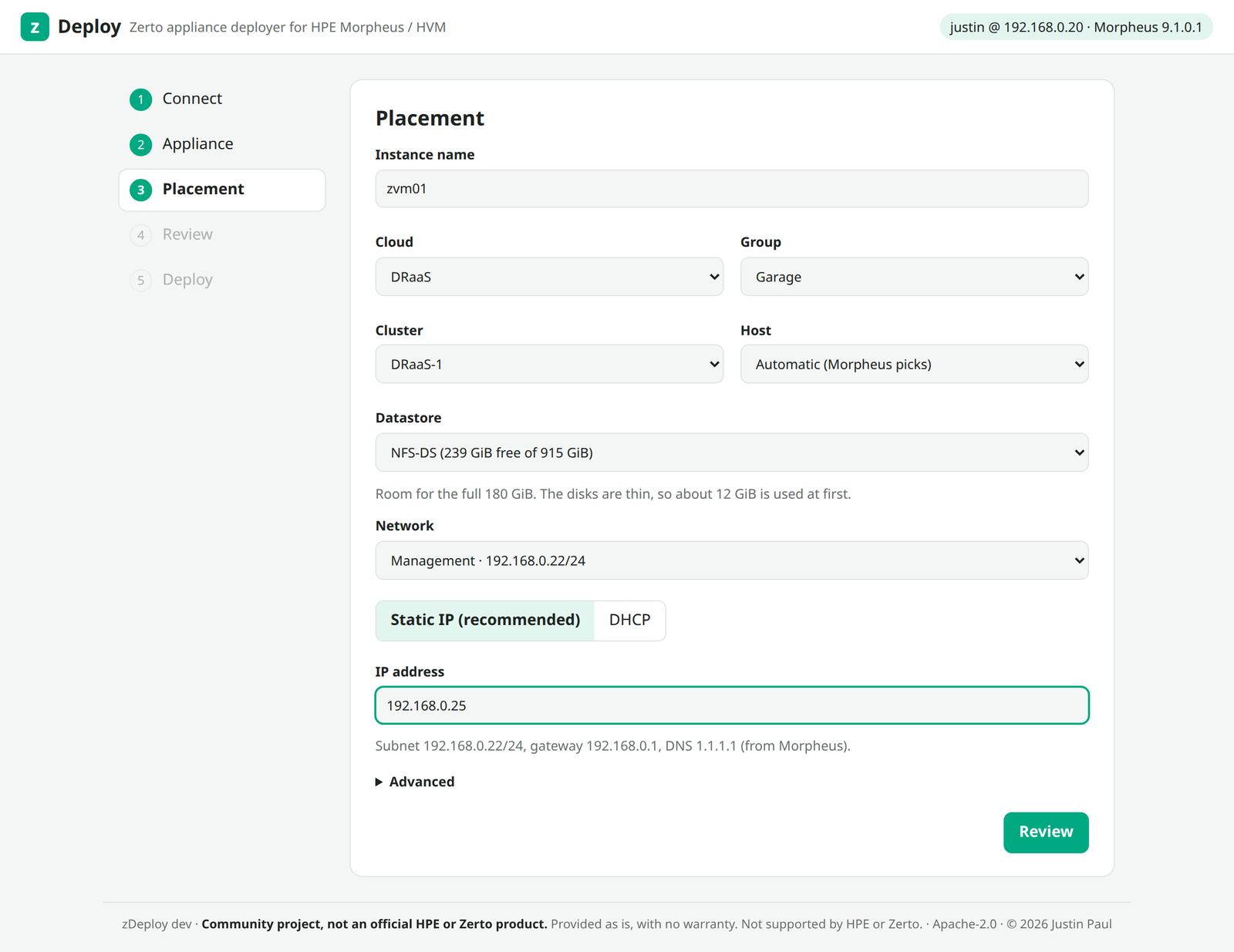
Everything here comes from your Morpheus inventory: cloud, group, cluster, host (or let Morpheus pick), datastore, network, and a static IP or DHCP. The subnet, gateway and DNS come from the network you pick, so all you type is the IP.
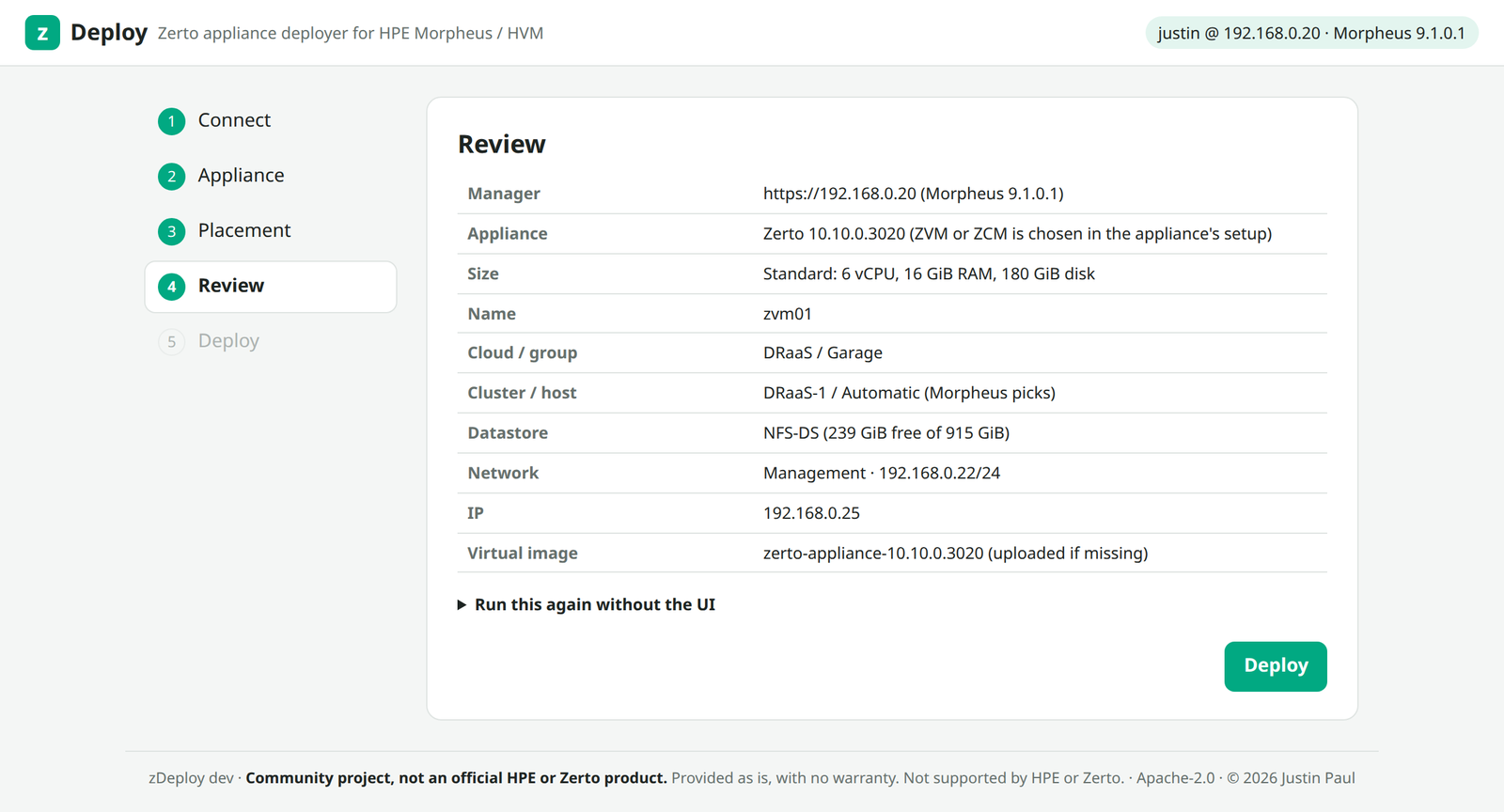
4. Review
A summary of everything zDeploy is about to do. There’s also a “Run this again without the UI” section that gives you the same deployment as a JSON spec for the headless mode (more on that below).
5. Deploy
Click Deploy and zDeploy checks everything before it creates anything:
- the datastore has room for the full 180 GB (Morpheus wants that free even though the disks are thin)
- the static IP is inside the network’s subnet and nothing is already answering on it
- the instance name isn’t taken
Then it does the six manual steps from above in order: creates the service plan, creates the virtual image, uploads the disks and metadata.json with live progress, and provisions the instance with one volume per disk. If the plan or a complete image already exists from an earlier run, it reuses them, so your second appliance skips the 7.9 GiB upload.
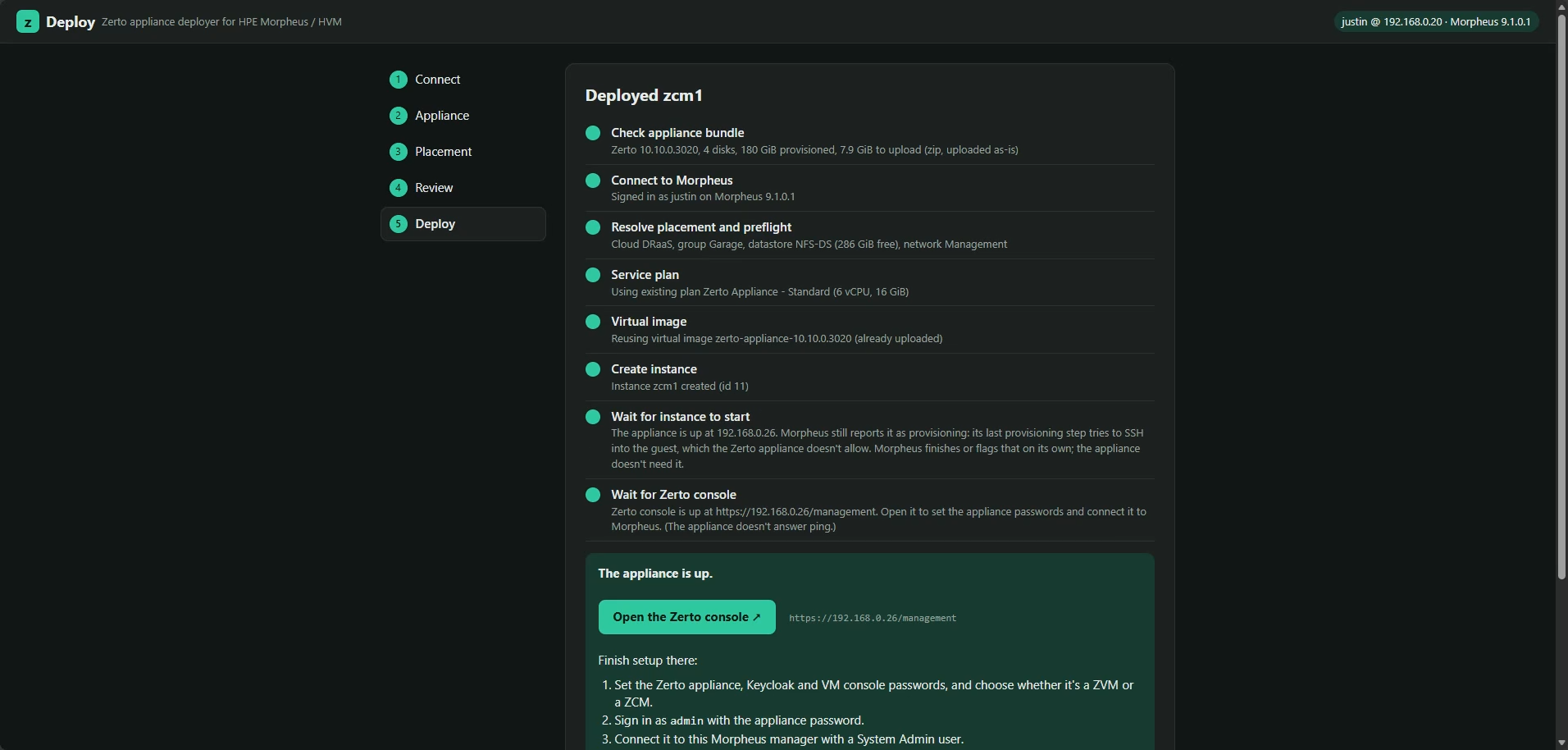
It calls the deployment done when the Zerto console answers on the new IP, and gives you a button that opens https://<ip>/management so you can go straight into the appliance setup. One thing to know: the appliance doesn’t answer ping, so test it in a browser, not with ping.
Windows, Mac and Linux
zDeploy is written in Go with only the standard library, and the wizard’s HTML is built into the binary. Every release ships five builds:
- Windows (
zdeploy-windows-amd64.exe) - macOS on Apple silicon (
zdeploy-darwin-arm64) and Intel (zdeploy-darwin-amd64) - Linux on x86 (
zdeploy-linux-amd64) and ARM (zdeploy-linux-arm64)
Why a binary and not just an HTML page? I wanted that too. But the Morpheus API rejects cross-origin requests from a browser, so a plain web page can’t talk to it, and a browser tab isn’t a great place to read 8 GB of disk images from anyway. The binary serves the wizard on localhost only, and every request needs a random session key, so other web pages can’t use it.
Headless, for the automation crowd
If you’d rather script it, the same engine runs from the command line with the JSON spec from the Review step:
export ZDEPLOY_PASSWORD='…'
./zdeploy deploy -f zvm01.json
Credentials come from environment variables and never get written into the spec file.
A log file for every run
Every deployment writes a log to a zdeploy-logs folder next to the binary. It records each step and every Morpheus API call (method, path, status, timing and any error Morpheus returned) and never records passwords or tokens. If something goes sideways, that file is what I’ll ask you for, and the wizard has a Download log button right on the result screen.
How to get it
zDeploy is open source under the Apache 2.0 license. Grab the latest build from the releases page:
https://git.jpaul.io/justin/zdeploy/releases
Each release has the five binaries and a SHA256SUMS file. The source, the full README and the disclaimer are at https://git.jpaul.io/justin/zdeploy.
Demo Video
What’s next
Version 1.1 is already planned: pick ZVM, ZCM or both in one run, and zDeploy deploys them side by side from a single image upload. After that, small, medium and large appliance sizes.
If you try it, I’d like to hear how it went, good or bad. Leave a comment here or find me on LinkedIn.