If you’ve been following along with The Workflow, my free course on the toolchain around AI coding, the last post got you set up and had you feel the three places the copy-paste loop breaks. This post fixes the worst one: no undo, no record, no safety. It’s the big one. Almost everything riskier in the rest of the course only becomes safe to attempt because of what we install here.
And here’s my pitch up front: you probably already know this tool or think you do. It’s Git. But I want to convince you to think about it in a way nobody taught me when I learned it: not as the thing you use to push code to GitHub, but as two things you need far more in the AI era than you ever did before. Undo for the AI. And memory the AI can read back.
Strip Git down to what you actually need
Forget the open-source mythology, the branching diagrams, the arguments about rebase. For our purposes Git is one thing: a tool that records snapshots of your files over time and lets you move between them.
Each snapshot is a commit. A commit is a labeled checkpoint: “here’s exactly what every file looked like at this moment, and here’s a note about why.” You can compare any two checkpoints, and you can return to any of them. That’s it. Branches, remotes, merges: all of it is built on top of “snapshots you can move between,” and none of it matters today. For now we only need the local core: init, commit, diff, log, restore.
That’s a small enough surface that you can genuinely learn it in an afternoon. Here’s the whole vocabulary:
git init -b main         # turn the current folder into a repository (once per project)
git status               # what's changed since the last commit?
git add .                # stage the changes you want in the next commit
git commit -m "message"  # save a checkpoint with a note
git diff                 # show the exact line-level changes not yet committed
git log --oneline        # list past checkpoints, newest first
git restore <file>       # discard uncommitted changes to a file (the undo)
Seven commands. Now let me give you the two reframes that make them matter.
Reframe 1: Commits are undo for the AI
Go back to my deleted function. The reason that hurt is that I had no checkpoint to return to. A commit is that checkpoint. Once you internalize that, the whole workflow rearranges itself around it:
- Get the project to a working state.
- Commit it. This exact state is now saved forever, with a message.
- Let the AI try something, anything, however risky.
- If it worked, commit again. If it didn’t,
git restorethrows away the mess and you’re back at step 2’s checkpoint, byte for byte.
Read step 4 again, because that’s the whole point. The cost of a bad AI change drops from “retype an hour of work from memory” to “throw away five minutes.” That’s the difference between AI-assisted coding feeling like a gamble and feeling like a sandbox.
And it compounds through the entire course. Every later module asks you to let the AI do something bolder: edit your real files directly, work on a branch, open a pull request, eventually run unattended. You can say yes to all of it precisely because you can always get back to a known-good state. Without this net, every AI change is a roll of the dice. With it, the downside is always just “undo and try again.”
One note on restore, because it’s the command you’ll lean on most: git restore <file> throws away uncommitted edits and snaps the file back to your last commit. That’s your everyday AI-undo. (Returning to an older commit, reverting a merge, the reflog: those are real recovery topics, but they get their own module later, once you’ve got remotes and PRs to make them meaningful. Today we only need “undo back to my last checkpoint.”)
Reframe 2: The repo is memory the AI can read back
This is the part almost everyone misses, and it’s the one I’m most excited to hand you.
An AI session is ephemeral. Close the tab and the agent’s working context is gone; it cannot remember yesterday, what you decided, or why that one weird function looks the way it does. That’s the second seam from last post, and on its face it looks unfixable. The chat just forgets.
But here’s the thing: the changes on disk aren’t gone. And Git turns your disk into a structured, queryable record of exactly what happened and what’s in flight. So a brand-new session (a fresh chat, or tomorrow’s agent that’s never seen your project) can answer “where were we?” entirely from ground truth, by reading Git:
| Command | What it tells a cold session | |—|—| | git status | What’s changed but not yet committed, including brand-new files. The “in-flight, unsaved” picture. | | git diff | The actual line-level edits sitting uncommitted. Not a summary; the real changes. | | git log --oneline | What’s already committed and settled: the project’s decision history. |
Together those cover every state a change can be in (untracked, uncommitted, committed) and a fresh agent can read all of it in one pass. No chat history. No re-explaining yesterday from your unreliable memory.
That reframes what committing is even for. You’re not just saving your work. You’re writing the project’s memory in a form the next AI session can read. The chat forgets. The repo remembers. And honestly, agents are great at this; reading state and reconstructing context is exactly what they’re best at. You’re playing to their strength.
Why “commit often” stops being a chore
Put the two reframes side by side and the discipline everyone nags you about just falls out on its own, no willpower required:
- The more granular your commits, the smaller the blast radius when the AI makes a mess. You restore to a checkpoint ten minutes back, not yesterday.
- The more granular your commits, the cleaner the reconstruction.
git logreads like a decision journal instead of one giant “stuff” commit.
So commit at every working state. Treat it as the autosave you control. “It runs and does what I expect” is a good enough reason to commit. You’re never committing too often.
The lab: prove it to yourself on tasks-app
Reading about a safety net is nothing like feeling one catch you. So the lab runs the whole loop on the tasks-app project from the last module. A heads-up: you’re still working in the browser chat here: paste the file in, ask for the change, paste the result back. Moving the AI into your editor comes later, on purpose. The whole point is to install the net first, before you ever let an AI touch your files directly.
First checkpoint. In your project folder, turn it into a repo and save your first snapshot:
cd ~/ai-workflow-course/tasks-app
git init -b main           # first branch named "main" (needs Git 2.28+)
git status                 # everything shows as "untracked"; Git sees it but isn't saving it yet
git add .
git commit -m "Initial commit: tasks app from Module 1"
git log --oneline          # one checkpoint exists now
(If git --version is older than 2.28, the -b main flag won’t work; run plain git init, finish your first commit, then git branch -m master main once. Either way you land on main, which everything later in the course assumes.)
You now have a net. Everything after this is recoverable.
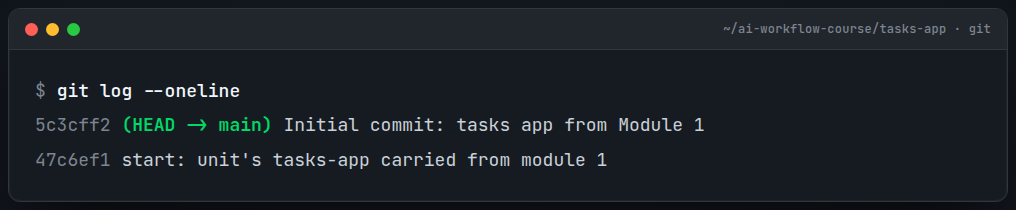
A change you can see. Ask the AI for a small feature (say, a count command that prints how many tasks are pending) and apply it to the file. Then, before you commit, read what actually changed:
git diffThis single habit replaces “paste it back and hope.” You’re looking at exactly what changed, nothing more, nothing less. Confirm it does what you asked and didn’t wander into files it had no business touching. Then commit it:
git add .
git commit -m "Add count command"
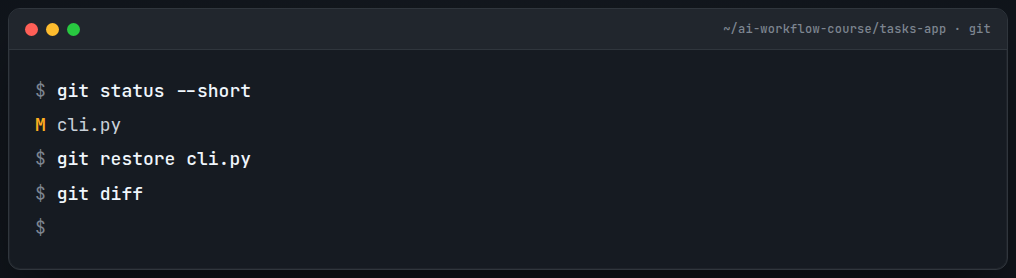
Now break it on purpose. Ask the AI to “aggressively refactor tasks.py” and paste the result over your file without reading it. Run the app. Maybe it’s broken, maybe it’s subtly wrong, maybe it’s just unrecognizable. Doesn’t matter; you’ve decided you don’t want it. Undo it completely:
git status                 # shows tasks.py as modified
git restore tasks.py       # discard the change, back to your last commit, byte for byte
git diff                   # empty. nothing changed. you're clean.
python3 cli.py list         # works again
That’s it. You just recovered from a bad AI change in one command, with zero retyping and zero guesswork. Sit with how cheap that was for a second; that cheapness is the thing that lets you say yes to riskier AI work for the rest of the course.
The memory trick. This is my favorite part, and it’s the one I want you to steal for every project you touch. Make one more committed change and one uncommitted one, so the repo has real state: commit a “help” command, then start a “delete” command but don’t commit it. Now open a brand-new AI chat. Tell it nothing about the project. Instead, run these and paste the output into the fresh chat:
git log --oneline
git status
git diff
Then ask: “Based only on this Git output, tell me where this project is: what’s settled, what’s in progress, and what I should do next.”
Watch a session that has never seen your project reconstruct its exact state (settled history from log, in-flight work from status and diff) with no chat history at all. That’s durable memory, and it’s the single highest-impact habit in this whole course. Make it your standard way to start a session on any project: “read the repo, then tell me where we are.”
The AI angle (why this matters more now, not less)
Everything above is standard Git that’s been around for nearly two decades. So what changed? Why does an old tool suddenly become the most important thing in an AI workflow?
Two reasons. First, the AI raises the value of undo. You’re making more changes, faster, with more confidence, yours and the model’s. And confidence is exactly what precedes a quiet mistake. The frequency of “wait, undo that” goes up with AI, not down, so cheap reliable undo matters more than it ever did.
Second, the AI has no memory, and the repo is the memory you hand it. That’s the gap nothing else fills. A smarter model doesn’t remember yesterday any better than a dumber one, but a model pointed at git log and git diff reads yesterday off the disk in seconds. You’ve replaced “re-explain the project from my flawed memory” with “read the ground truth.”
There’s a third payoff that pays dividends later: AI changes are reviewable as diffs. git diff turns “the AI rewrote my file” into a precise, line-by-line account of what it actually did. That’s the entire foundation the review skill is built on a few modules from now, and it starts here, with you reading a diff before you commit.
Where it breaks (because I’d rather you trust me)
A safety net you over-trust is its own hazard, so here’s the honest fine print:
- Git only sees what was written to disk. This is the limit to teach yourself hard. If the AI reasoned brilliantly about an approach in the conversation but you never wrote it to a file, it’s gone with the session; Git can’t recover what was never on disk. The repo is ground truth, but only for things that became files. (Which, conveniently, is one more argument for committing often: the more you write down, the less lives only in ephemeral chat.)
- A single local repo is not a backup. Everything in this module lives on one disk. Drop the laptop in a lake and it’s all gone, history and all. Git gives you recovery (moving between checkpoints) but not backup, an offsite copy. That’s a later module’s job, and I’ll be just as honest there about where the analogy holds.
git restoreis a loaded gun pointed at uncommitted work. It discards changes permanently. That’s exactly what you want for throwing away the AI’s mess, but run it on edits you actually wanted and they’re gone, no second prompt. The defense is the same habit as everything else here: commit often, so “uncommitted” is always a small window.
You’re done when
Your tasks-app is a Git repo with a handful of commits, and git log --oneline reads like a sensible story of what you did. You’ve personally restored a file after a bad change and watched git diff go empty. You’ve had a fresh AI session correctly describe your project’s state from Git output alone. And you can explain the one thing Git can’t recover (anything never written to disk) and why that argues for committing often.
When undo feels free and starting a cold session feels like “just read the repo,” you’ve got the net. Everything dangerous from here gets a lot less dangerous.
Next up, I put this net to work on the lowest-risk target imaginable (plain documents, not code) before we finally let the AI out of the browser and into your editor.
If you’ve ever lost work to a confident AI, or if you’ve got a Git habit that’s saved your bacon, drop it in the comments; I read them, and the war stories are half of what makes this worth writing.